뉴비벡엔드개발자

  • 홈

github 2

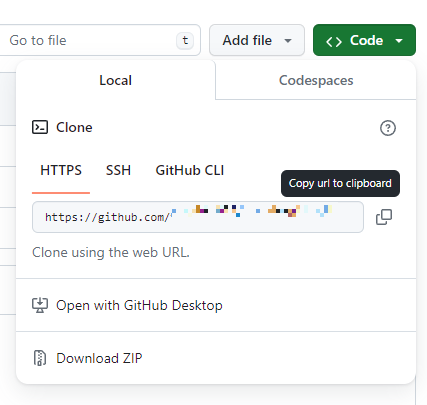
[vscode] git clone

1. github에서 url 복사 2. vscode에서 cloneRepository 클릭 3. 붙여넣기 폴더 정하면 끝

IDE/Vscode 2024.03.11

[vscode] github 연동

1. github에서 새로운 repository 만들기 GitHub GitHub: Let’s build from here GitHub is where over 100 million developers shape the future of software, together. Contribute to the open source community, manage your Git repositories, review code like a pro, track bugs and fea... github.com 2. 링크 복사 3. vscode 에서 remote 클릭 4. 링크 붙여넣기 이름 입력 5. 확인 push를 한 후 git log --oneline --all --graph 를 하면 master 뒤에 origin..
IDE/Vscode 2024.03.11
이전
1
다음
더보기
프로필사진

  • 분류 전체보기 (55)
    • Java (1)
      • Spring (13)
    • Javascript (28)
      • nodejs (10)
      • React (4)
      • TypeScript (13)
    • IDE (4)
      • Intellij (1)
      • Vscode (3)
    • Docker (3)
    • git (2)
    • 오류 (1)
    • backend (0)

Tag

IntelliJ, Pageable, Git, javascript, spring boot, spring, nodejs, react, Entity, 연동, typescript, mongoose, Node.js, 페이징, Docker, 데이터 보존, mongo, github, vscode, MongoDB,

최근글과 인기글

  • 최근글
  • 인기글

최근댓글

Archives

Calendar

«   2025/12   »
일 월 화 수 목 금 토
1 2 3 4 5 6
7 8 9 10 11 12 13
14 15 16 17 18 19 20
21 22 23 24 25 26 27
28 29 30 31

방문자수Total

  • Today :
  • Yesterday :

티스토리툴바